Spark
Resources
-
Apache: Quick Start ⟶ SQL Guide
-
Oreilly: Spark: The Definitive Guide (2018)
01: What is Apache Spark?
Spark: a unified computing engine & set of libraries for parallel data processing on compute clusters.
3 key components:
Unified
-
Supports wide range of analytics tasks
-
Can use available APIs or write your own libraries on top
-
One scan can include load ⟶ query ⟶ model
Computing engine
- Spark processes data, it doesn't provide permanent storage
Libraries (Spark Packages)
-
Spark SQL
-
MLlib
-
Spark Streaming
-
GraphX
Background
Sam
Why do we need a new engine like Spark?
A processor (CPU): the chip that executes instructions. These include 1+ cores.
How do computers become faster?
-
Before 2005 ⟶ increase single-core performance
-
After 2005 ⟶ add more cores (parallel capacity)
Spark optimizes for this ^ by executing tasks in parallel.
In 2009, Spark created by Matei Zaharia. Current model at the time was MapReduce.
MapReduce (model at the time)
-
Processing Model: Map into K-V pairs ⟶ shuffle & sort into groups ⟶ reduce each group to compute result.
-
Execution Storage: Disk
Spark runs in-memory instead.
-
Processing Model: distributed data-parallel
-
Execution Storage: In-memory (disk if needed)
MapReduce vs Spark
-
MapReduce: requires many passes, each written as separate jobs
-
Spark: multistep apps running in-memory
MapReduce advantages vs older tech
-
Linear scalability: when data grows ⟶ add nodes
-
Fault-tolerance: if a node fails ⟶ recover w/o losing progress
-
Data locality: processes data near storage loc (fast)
Spark (in addition to MR advantages)
-
Low latency: in-memory
-
Deployment flex: Cluster manager options & storage options
-
Unified stack: Can combine many different libraries
02: API Overview
Spark Architecture
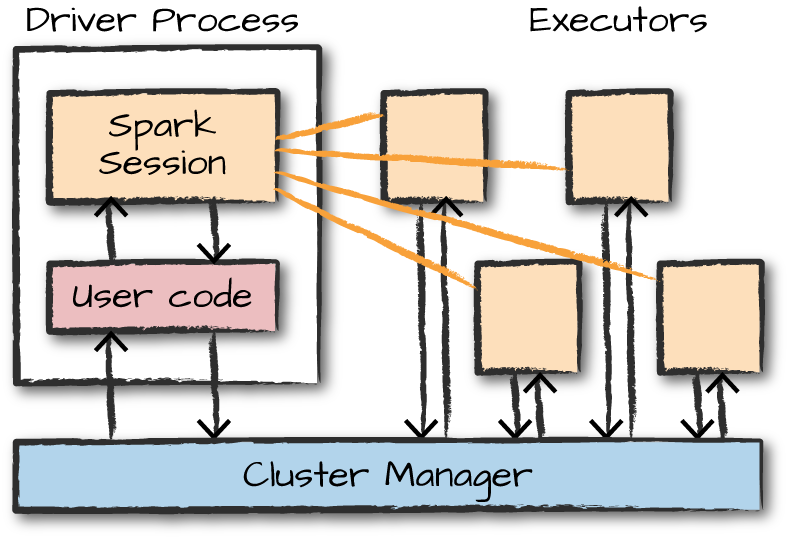
Spark Applications
-
Driver: maintains all relevant information during app lifetime
-
Executor: carries out the work. Executes code, reports state of computation back to driver.
-
A Spark application starts.
-
It contacts the cluster manager (YARN/Mesos/Kubernetes).
-
The cluster manager allocates machines/resources.
-
The driver process starts.
-
The driver launches executor processes on worker nodes.
-
Executors run tasks and report results back to the driver.
APIs
2 sets of APIs
-
Unstructured (RDDs / Distributed Variables)
-
Structured (Datasets / DataFrames / SQL)
Partitions: collection of rows, sits on a machine in cluster
Transformations & Actions
-
Transformations (lazy): the "instructions" to modify data
-
Actions: triggers to compute result
Spark lazily executes a DAG of transformations in order to optimize the execution plan on DataFrames.
04: Structured API Overview
Most Structured APIs apply to both batch & streaming computation.
- Catalyst: Spark's internal engine. (Spark converts Python/R to Catalyst.)
Schemas: defines column names & column types Columns
-
Simple types (integer, string, etc)
-
Complex types (array, map, etc)
-
Null values
Pg 59: Table 4-1. Python type reference
API Execution
-
User writes code
-
Spark converts to Logical Plan
-
Spark converts to Physical Plan ⟶ checks for optimization
-
Spark executes RDD manipulations on the cluster
05: Basic Structured Operations
Schema-on-read can be slower than defining it ourselves on csv and json formats. You should define it yourself when performing production ETL.
Expressions - set of transformations on 1+ values in a record in a DataFrame. This value can include complex types like array or map
StructType - type of our schema. Made up of our fields.
StructFields - Provides us with - name of column, column type, whether we can have nulls. PAGE 59 FOR COLUMN TYPES.
DataFrames
JSON manual schema example (page 67)
Creating DataFrames
from pyspark.sql import Row
from pyspark.sql.types import StructField, StructType, StringType, LongType

myManualSchema = StructType([
  StructField("DEST_COUNTRY_NAME", StringType(), True),
  StructField("ORIGIN_COUNTRY_NAME", StringType(), True),
  StructField("count", LongType(), False,
              metadata={"hello":"world"})])


# Manual schema
df = spark.read.format("json")\
    .schema(myManualSchema)\
    .load("/data/flight-data/json/2015-summary.json")


# Schema on read
df = spark.read.format("json")\
    .load("/data/flight-data/json/2015-summary.json")


df.printSchema
df.columns
Columns and expressions (page 68)
# Referring to a column
from pyspark.sql.functions import col
col("someColumnName")


# These 3 are the same thing
expr("myCol - 5")
expr("myCol") - 5
col("myCol") - 5
Creating Rows (page 71)
from pyspark.sql import Row
myRow = Row("Hello", None, 1, False)

# 1st value
myRow[0]
DataFrame Transformations
We can..
-
Add rows or columns
-
Remove rows or columns
-
Transform a row into a column (or vice versa)
-
Sort data by values in rows
Manually creating DataFrame (page 73)
myManualSchema = StructType([
    StructField("some", StringType(), True),
    StructField("col", StringType(), True),
    StructField("names", LongType(), False)])

myRow = Row("Hello", None, 1)
myDf = spark.createDataFrame([myRow], myManualSchema)
myDf.show()
Selecting column, renaming (page 76)
# Multiple columns
df.select(
  "DEST_COUNTRY_NAME",
  "ORIGIN_COUNTRY_NAME").show(2)


# Rename column
df.select(
  expr("DEST_COUNTRY_NAME as destination").alias("DEST_COUNTRY_NAME"))\.show(2)


# Rename column - old, new
df.withColumnRenamed(
  "DEST_COUNTRY_NAME", # old
  "dest")              # new


# Rename column with extra characters
# Need to use `` so Spark knows its a column name
dfWithLongColName.selectExpr(
  "`This Long Column-Name`",
  "`This Long Column-Name` as `new col`")\
.show(2)


# Shortcut - selectExpr
df.selectExpr(
  "DEST_COUNTRY_NAME as newColumnName",
  "DEST_COUNTRY_NAME").show(2)
New columns, aggregate functions, literals (page 76)
# Drop columns
df.drop("ORIGIN_COUNTRY_NAME", "DEST_COUNTRY_NAME")


# Create a new column
# withinCountry will be a boolean of T / F
df.selectExpr(
  "*",
  "(DEST_COUNTRY_NAME = ORIGIN_COUNTRY_NAME) as withinCountry")\.show(2)


# Aggregate functions
df.selectExpr(
  "avg(count)",
  "count(distinct(DEST_COUNTRY_NAME))").show(2)


# Literal
# Creates column called "One"
# Each value will just be the number "1"
from pyspark.sql.functions import lit
df.select(
  expr("*"),
  lit(1).alias("One")).show(2)


# Filter with boolean flag
df.withColumn(
  "withinCountry",
  expr("ORIGIN_COUNTRY_NAME == DEST_COUNTRY_NAME"))\
.show(2)
Casting, filtering (page 80)
# Cast - convert column that was called "count"
df.withColumn(
  "count2",
  col("count").cast("long"))


# Filtering - can do with filter() or where()
df.where("col1 < 2").show(2)


# Multiple filters
df\
.where(col("count") < 2)\
.where(col("ORIGIN_COUNTRY_NAME") != "Croatia")\
.show(2)


# Unique rows
df.select(
  "ORIGIN_COUNTRY_NAME",
  "DEST_COUNTRY_NAME").distinct().count()
Random samples and splits (page 83)
# Random sample
seed = 5
withReplacement = False
fraction = 0.5
df.sample(withReplacement, fraction, seed)


# Random split
seed = 5
dataFrames = df.randomSplit([0.25, 0.75], seed)
Union (page 83)
# Creates the new table
from pyspark.sql import Row
schema = df.schema
newRows = [
  Row("New Country", "Other Country", 5L),
  Row("New Country 2", "Other Country 3", 1L)]

parallelizedRows = spark.sparkContext.parallelize(newRows)
newDF = spark.createDataFrame(parallelizedRows, schema)


# Union with the old table
df.union(newDF)\
.where("count = 1")\
.where(col("ORIGIN_COUNTRY_NAME") != "United States")\
.show()
Order by, limit, repartition (page 85)
asc_nulls_first, desc_nulls_first, asc_nulls_last, desc_nulls_last
from pyspark.sql.functions import desc, asc

# Ordering by
df.orderBy("count desc", "DEST_COUNTRY_NAME").show(5)


# Using limit
df.orderBy(expr("count desc")).limit(6).show()


# Repartition - can do according to frequently filtered columns
# Note that the "5" is optional
df.repartition(5, col("DEST_COUNTRY_NAME"))


# Coalesce - will try to combine partitions without performing full shuffle
df.repartition(5, col("DEST_COUNTRY_NAME")).coalesce(2)
Collecting rows to driver (page 87)
-
Collect - gets all data from entire DataFrame
-
Take - only gets first N rows
-
Show - prints out N rows nicely
collectDF = df.limit(10)
collectDF.take(5)
collectDF.show()
collectDF.show(5, False)
collectDF.collect()  # could crash driver


# Iterates over whole dataset partition by partition
# Could crash driver if large partitions
collectDF.toLocalIterator()
Spark SQL
Better than using RDD to handle complex manipulation, prep for ML
-
Built on top of core Spark
-
Provides dataframe API
-
Uses Catalyst Optimizer
Entry point = SparkSession (created in Spark Shell)
-
Can write queries in Hive and use Hive UDF's without needing Hive
-
Able to turn RDD into dataframe
from pyspark import SparkConf
from pyspark import SparkContext
from pyspark.sql.types import *
bids = spark.read.option("inferSchema","true")\
.csv(data_file)
bids = bids.toDF(*cols)

df = spark.read.json("file:/databricks/driver/yelp.json")
df.printSchema()
df.take(5)


data = spark.read.option("header", "true") \
.option("delimiter", "\\t") \
.csv("/databricks-...") \
.cache()
# Write dataframe into file
maxprices.write.csv("maxprices")

# Verify - there are multiple files, parallel processing (each partition of your data may write its own output)
!ls -l maxprices/

# Take all data into one file
! cat maxprices/* > maxprices.csv

# Head of the file
! head maxprices.csv
Machine Learning
Data Types: vectors
-
Label
-
Feature column: vector of the observation
-
Dense: array
-
Sparse: only the non-zeros, has the index and the value
- less storage, faster
-
Abstractions
-
DataFrame: Dataset with feature vector
-
Transformer: (does not require training) Transforms df into another
-
Estimator: (requires training) Runs an algorithm on a data set to fit a model
-
Pipeline: Chains multiple steps to define a machine learning workflow