MCP
Resources
-
MCP Hub | Docker - "plug and play"
MCP (Model Context Protocol) is an an open-source standard for connecting AI apps ⟶ external systems.
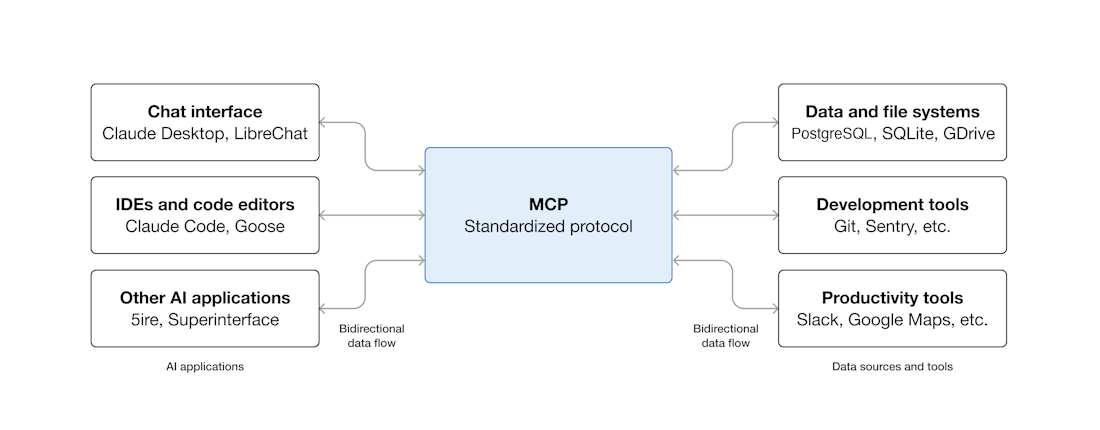
Client sends requests ⟶ server processes requests ⟶ delivers context to the AI.
MCP server may gather context in multiple ways:
-
executing code to perform an action & retrieving the result
-
calling external APIs
-
other similar operations
MCP clients can interact with MCP servers running as containers.
-
Gordon
-
Claude Desktop
-
Cursor
Build
-
Servers (to expose your API)
-
Clients (apps that connect to MCP servers)
Why MCP is important
MCP:
-
standardizes integrations so AI can talk to many tools reliably without bespoke connectors
-
makes LLMs context-aware by delivering real data/tools in real time
-
enables agent-style workflows where AI can act on systems (not just answer questions)
-
scales integrations across tools, reducing development overhead
Why there’s an MCP Catalog on Docker Hub
Docker’s MCP Catalog is a registry of containerized MCP servers—each server enables AI agents to interact with a specific API or service (e.g., GitHub, MongoDB, Redis) via MCP. Developers can pull and run these MCP servers in Docker to extend AI workflows securely and consistently.
Why it’s significant for developers
-
Discover and reuse prebuilt MCP servers instead of building connectors from scratch. (Docker Documentation)
-
Integrate AI tools (VS Code, Claude Desktop, Gordon, etc.) with real systems more easily. (Docker)
-
Build AI-augmented automation (manage repos, query databases, operate APIs) via natural language. (Docker Documentation)
Limitations & risks (contextual caution)
MCP’s power means giving AI access to tools/data. Security issues and misconfigurations can surface, so governance, authentication, and vetted MCP servers matter in real deployments. (itpro.com)
TL;DR
llm_code: a RAG system that
-
builds and queries an index and
-
runs the agent
MCP: how I'll expose/consume tools + data sources
What MCP is
-
You run an MCP server that offers “capabilities” (tools/resources/prompts) over a standard protocol.
-
A client app (ChatGPT, Claude Desktop, Codex, your own agent runner) connects as an MCP client and calls those capabilities.
Where MCP fits in llm_code
Option A — Expose llm_code as an MCP server (most direct fit)
-
You keep your ingestion/indexing/retrieval/agent code.
-
You add an MCP layer that exposes tools like:
-
ask(query)→ runs your RAG query path -
index(source)→ runs your indexing pipeline -
get_sources()/get_trace(id)etc.
-
-
Result: ChatGPT/Codex/Claude (or any MCP-capable client) can use your system without a bespoke integration each time.
Option B — Consume other MCP servers inside llm_code (connectors/tools)
-
Instead of writing one-off integrations (SharePoint, DBs, browsers, etc.), you call existing MCP servers as standardized tools.
-
Docker Hub has a growing catalog of MCP servers (Playwright, Neo4j, databases, etc.). (Docker Hub)
-
Your RAG stays the same; MCP just supplies more tool/data access. (Model Context Protocol)
When MCP “replaces” something (and what it replaces)
MCP can replace custom glue code you wrote to
-
authenticate to external systems,
-
fetch documents,
-
run a tool (browser automation, DB query, etc.),
-
standardize tool schemas across clients.
It does not replace:
-
chunking/embedding/indexing,
-
retriever logic,
-
orchestration/agent policy,
-
evaluation/observability (LangSmith, etc.).
Quick decision rule
Use MCP if you want either:
-
Multiple front-ends (ChatGPT/Codex/Claude/internal UI) to call
llm_codeconsistently. (OpenAI Platform) -
Plug-and-play integrations via existing MCP servers instead of building connectors yourself. (Docker Hub)